

Our verdict (updated October 2026)
Surfer SEO is worth it if you publish 4+ articles a month and want a clear, data-backed checklist for every post.
- Try it free: 7-day trial with Pro-plan access for new accounts (card required; cancel before day 7 to avoid a charge)
- Paid plans from $49/month billed yearly ($59 billed monthly)
- Live Content Score in the Content Editor; higher plans add AI visibility tracking for ChatGPT, Perplexity and Google AI Overviews
Try Surfer SEO free for 7 days →
Affiliate link: we may earn a commission if you sign up, at no extra cost to you. See our affiliate disclaimer.
I use Surfer to check every client blog and optimize each page for SEO and AI search. Want the rest of my stack? Get it free →
Zero-click searches and AI tools like ChatGPT have business owners worried about their organic traffic disappearing. When people get answers without clicking through to websites, your SEO efforts feel wasted. Surfer SEO positions itself as a content optimization tool that helps you create articles so useful and well-structured that people still click through, even in an AI-dominated search landscape.
I’ve tested Surfer SEO to see if it lives up to the hype in 2026. The tool analyzes top-ranking pages and gives you data-driven recommendations for your content. Plans start at $49 per month (Discovery, billed yearly) and include features like a content editor, keyword research, AI article generation, and SEO audits. The platform also offers solid customer support and integrates with tools like Semrush and Google Docs.
This review covers everything from new features and pricing to how Surfer compares against alternatives. I’ll walk you through the pros and cons so you can decide if it’s worth the investment for your business.
Key Takeaways
- Surfer SEO helps optimize content through data-driven recommendations starting at $49 per month (billed yearly)
- The tool includes a content editor, keyword research, AI writing features, and SEO audit capabilities
- Surfer works best for businesses focused on creating optimized content that ranks well in search engines
What Is Surfer SEO? (Beyond Just Keywords)

Surfer SEO is an on-page optimization tool that helps you create content designed to rank higher in search results. I’ve found it goes far beyond basic keyword research by analyzing ranking factors from top-performing pages and giving you clear steps to improve your content.
The platform started in Poland when five friends wanted to make SEO easier for everyone. Now it’s used by over 15,000 businesses in 140 countries.
Here’s what makes Surfer different from basic keyword tools:
- Content Score – Real-time feedback showing how well your content matches top-ranking pages
- SERP Analyzer – Examines ranking factors from competitors to guide your page optimization
- Audit Tool – Finds SEO errors in your existing content and suggests fixes
- Content Structure – Shows you the right number of words, headers, paragraphs, and images to use
Surfer analyzes search intent, keyword density, meta tags, and content length from pages that already rank well. It then gives you specific guidelines to follow.
The tool includes a keyword research tool that finds keyword clusters and shows keyword difficulty plus monthly search volume. I also use the Keyword Surfer chrome extension to see search data directly in Google without opening the main platform.
You get access to features like internal linking suggestions, content planner, WordPress plugin, and team collaboration tools. The platform even connects with Google Search Console for deeper insights.
Surfer uses data like TF-IDF, LSI keywords, and SERP similarity to help with on-page SEO optimization. It’s not just about stuffing keywords into your content. The focus is on creating well-structured articles that match what search engines want to see.
Surfer’s Biggest Recent Features

Surfer rolled out major updates in 2025 that shift the tool from pure Google optimization to full AI visibility tracking. The AI Tracker now monitors how your content performs in ChatGPT and Perplexity, while Brand Knowledge teaches the system your unique voice for consistent AI writing output.
The AI Tracker: Ranking in ChatGPT & Perplexity
I tested the AI Tracker extensively, and it’s the most significant addition to Surfer this year. The tool monitors when AI models like ChatGPT and Perplexity cite your content in their responses.
You can view full AI-generated answers for specific prompts. This shows exactly how these models frame topics and which brands they trust most. The tracker includes a Mentions column that flags whether you’re named in source content and a Brands column showing which competitors get top placement.
The Fan-out Queries tab reveals supporting questions that AI models use to build answers. If you only cover the main topic, you miss these side doors where competitors gain citations. I found this particularly useful for identifying content gaps.
Sentiment tracking catches negative or misleading mentions before they spread. The system also flags paid link opportunities in tracked sources, letting you purchase placements directly. Enterprise users get API access and Looker Studio integration to blend AI visibility data with existing analytics.
Brand Knowledge: Teaching AI Your Voice
Brand Knowledge trains Surfer‘s AI writer to match your specific tone and terminology. I upload style guides, past content, and brand documents into the system. The AI then references these materials when generating new content or running Auto-Optimize.
This solves the generic output problem I experienced with earlier AI writing tools like Jasper AI. When I use Surfer AI now, it maintains consistency across articles without constant manual editing. The system applies Brand Knowledge automatically during content generation.
Auto-Optimize merged with Insert Facts in December 2025. One click now adds missing entities, inserts real facts from search results and language models, and writes additional paragraphs when needed. The tool uses natural language processing to keep the additions aligned with your voice.
The Classic Content Editor (Still the Best?)
The Content Editor remains Surfer’s core feature, but 2025 updates made it more focused on pre-publish quality. I now get a Pre-Publish Review panel with three checks: Flesch Reading Ease score, plagiarism detection, and AI readability tips.
The AI readability suggestions specifically optimize structure so AI models can extract and cite information more easily. Long text blocks and weak headings hurt both human readers and AI citation rates. The review acts as a final quality gate.
Real-time NLP term suggestions still appear as I write. The editor benchmarks my content against top-ranking competitors and shows heading recommendations. I can hit Auto-Optimize at any point to fill content gaps with entity-rich paragraphs that match my brand voice. The scoring system updates live as I make changes.
Surfer SEO Pricing 2026: Every Plan Explained (From $49/mo)
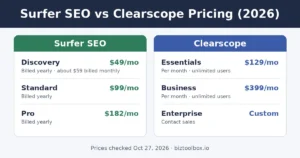
Short answer: Surfer SEO costs $49 to $299 per month billed yearly, or $59 to $359 billed monthly. New accounts get a 7-day free trial with Pro access. For most small businesses, the right plan is Discovery or Standard.
Surfer replaced its old Essential and Scale plans with Discovery, Standard, Pro and Peace of Mind. There is also a tracking-only AI Search Analytics plan and a custom Enterprise tier. Here’s every plan side by side.
Surfer SEO pricing at a glance
| Plan | Paid yearly | Paid monthly | Docs | Best for |
|---|---|---|---|---|
| Discovery | $49/mo | $59/mo | 10/mo | Solo owners |
| Standard | $99/mo | $119/mo | 30/mo | Most small businesses |
| Pro | $182/mo | $219/mo | 30/mo | Agencies, multiple brands |
| Peace of Mind | $299/mo | $359/mo | Unlimited* | High volume, API access |
| AI Search Analytics | $82/mo | $95/mo | Tracking only | AI visibility only |
| Enterprise | Custom | Custom | Custom | Large orgs |
*Fair usage policy applies. Prices and limits checked on Surfer’s official pricing page on October 24, 2026. Yearly plans get the full year of documents upfront (for example, 360 on Standard and Pro, 120 on Discovery). Standard tracks 25 AI prompts weekly in ChatGPT; Pro tracks 50 daily and Peace of Mind 100 daily across all major AI models. Seats: 1 on Discovery, 3 on Standard, 5 on Pro, 10 on Peace of Mind.
Which Surfer plan should you choose?
- Discovery ($49/mo yearly): Pick this if you’re a solo owner writing your own blog. Ten documents a month covers about two posts a week, with live optimization guidelines and the Surfy AI assistant.
- Standard ($99/mo yearly): My pick for most small businesses. You get 30 documents a month, 3 seats, a plagiarism checker, 1-click optimization, rank drop alerts and AI visibility tracking in ChatGPT.
- Pro ($182/mo yearly): Where agencies land. It adds 5 brand workspaces, 1-click internal linking, content gap ideas, a cannibalization report and daily tracking across ChatGPT, Perplexity, Gemini and Google’s AI results.
- Peace of Mind ($299/mo yearly): Only worth it if you publish more than 30 pieces a month or need API access and a dedicated success manager.
- AI Search Analytics ($82/mo yearly): For brands that only want to see how AI tools mention them, without the content editor.
Does Surfer SEO have a free trial?
Yes. New accounts get 7 days of full Pro-plan access for free. You choose a plan and enter a card at checkout, and after 7 days the trial converts to that plan and charges your first billing period automatically.
To cancel during the trial, go to Settings > Billing > Your subscription and click Cancel subscription. You keep access until day 7, then the account expires and stored data is removed. The trial is for new accounts only, so a card already used on a Surfer account won’t qualify.
Monthly vs. yearly billing
Paying yearly saves about 17%, from $120 a year on Discovery up to $720 on Peace of Mind. The catch is that yearly plans are charged upfront for the whole year, and your document credits reset yearly or when you change plans.
Plans renew automatically. You can turn off auto-renewal from the in-app Billing page at any time and keep access through the period you’ve already paid for. My advice: after the trial, go monthly for a month or two, then switch to yearly once Surfer is part of your routine.
What counts toward your limits
Each article you create or optimize in the Content Editor uses one document. Tracked pages are the URLs Surfer monitors for ranking drops and refresh ideas. Surfer’s pricing page doesn’t list add-on packs, so if you regularly hit your limit, the fix is moving up a plan.
Surfer vs. The Alternatives
Surfer sits in a crowded market where pricing and strategic depth separate the winners from the rest. At $49/month (billed yearly) for the entry-level Discovery plan, Surfer faces pressure from cheaper options like Frase and premium strategists like MarketMuse that approach content differently. If you’re choosing between Surfer and Clearscope specifically, I break down pricing, AI tracking and team seats in my Surfer SEO vs Clearscope comparison.
Surfer vs. Frase (The Budget Battle)
Frase starts at $45/month compared to Surfer’s $49/month entry point on yearly billing ($59 if you pay monthly), so the price gap is much smaller than it used to be.
Both tools handle content optimization well, but their approaches differ significantly. Frase focuses heavily on research and question extraction from search results. I can pull SERP questions automatically and build content briefs faster in Frase. Surfer puts more emphasis on real-time content scoring and keyword density analysis while I write.
Key Differences:
| Feature | Surfer | Frase |
|---|---|---|
| Starting Price | $49/month (billed yearly) | $45/month |
| SERP Question Extraction | Limited | Advanced |
| Content Editor Scoring | Real-time | Brief-focused |
| Research Depth | Good | Better |
Frase wins on research capabilities and budget constraints. Surfer provides a more polished content editor with better live optimization feedback. Neither tool matches the full seo suite capabilities of Semrush or Ahrefs.
Surfer vs. MarketMuse (The Strategy Battle)
MarketMuse takes a fundamentally different approach than Surfer. It builds content inventories and identifies topic clusters across entire sites instead of optimizing individual pages.
Pricing reflects this strategic focus. MarketMuse starts at $149/month but quickly jumps to custom enterprise pricing. Surfer’s pricing stays more accessible for small teams and solo creators.
Strategic Approach:
- Surfer: Single-page optimization focus
- MarketMuse: Site-wide content planning and authority building
I use MarketMuse when planning comprehensive content strategies across dozens of related topics. The tool analyzes my entire site and shows content gaps competitors have filled. Surfer works better when I know exactly what page I need to optimize and want immediate scoring feedback.
MarketMuse requires more investment in both time and money. The learning curve is steeper than Surfer, Clearscope, or Scalenut. For agencies managing multiple client sites, that strategic depth justifies the cost. For individual content creators optimizing blog posts, Surfer’s straightforward editor makes more sense.
Pros and Cons
Surfer SEO offers strong data-driven content optimization features and integrations that streamline SEO workflows, but the platform comes with a higher price tag and requires time to master effectively.
Pros (Data, AI Features, Integration)
The data-driven approach is what sets Surfer SEO apart from generic SEO guidelines. I found that analyzing over 500 on-page signals helps create content that aligns with what actually ranks, not just theory. The Content Editor gives real-time feedback on keyword usage, structure, and word count based on current SERP data.
AI features speed up the content optimization process significantly. The AI Outline Generator creates briefs automatically, which saves hours of manual research. The Auto-Optimize feature updates existing content with one click, making it easier to maintain content quality at scale.
Integration options make Surfer SEO fit smoothly into most SEO workflows. The platform connects with Google Docs, WordPress, and Jasper for seamless writing and publishing. Google Search Console integration improves the accuracy of the Topical Map feature. The API supports bulk optimizations for agencies handling multiple clients.
The SERP Analyzer breaks down competitor pages into actionable metrics. I can see exactly what top-ranking content includes and adjust my SEO strategy accordingly. This beats guessing what search engine optimization factors matter most for any given keyword.
Cons (Expensive, Steep Learning Curve)
Pricing starts at $49 per month (Discovery, billed yearly) and goes up to $299 per month for Peace of Mind ($59 to $359 on monthly billing). That cost adds up quickly for freelancers or small teams with limited budgets. Other content optimization tools offer similar features at lower price points, making Surfer SEO harder to justify for some users.
The learning curve is steeper than expected. New users often struggle to interpret the data and apply suggestions correctly. The interface displays many metrics at once, which can overwhelm someone unfamiliar with technical SEO concepts.
Keyword research capabilities fall short compared to dedicated tools. The database is smaller and lacks advanced filters like CPC or competitive density. I found myself needing external platforms to fill gaps in my SEO workflow, which defeats the purpose of an all-in-one solution.
The tool focuses heavily on correlation, not causation. Just because top pages share certain traits doesn’t mean those factors directly caused their rankings. Following every suggestion without critical thinking can lead to formulaic content that sacrifices originality for SEO optimization alone.
Final Verdict: Is Surfer Essential For Small Business In 2026?
For small businesses focused on organic traffic growth, Surfer is a practical choice but not strictly essential. I’ve seen content creators and bloggers get real results with it, but your budget and content volume matter.
Who benefits most:
- Digital marketers managing 4+ articles per month
- Content creators who need consistent SEO features without guessing
- Small SEO agencies handling multiple client sites
- Bloggers serious about improving search engine rankings
- Affiliate marketers who need SEO-friendly posts that rank and drive commissions
When you might skip it:
- You publish less than 2 articles monthly
- Your budget is under $100/month for all tools
- You’re comfortable with manual SERP analysis
- You already have a solid content strategy and just need basic checks
The Content Editor gives you data-backed guidance for content planning. This helps when you’re building content marketing programs or trying to match what ranks on search engine results pages. I found the internal linking tool particularly useful for small teams without dedicated SEO professionals.
Key considerations for small business:
| Factor | Impact |
|---|---|
| Monthly content volume | High volume = better ROI |
| Team size | Helps coordinate multiple writers |
| SEO knowledge | Useful for beginners and pros |
| Budget flexibility | Mid-tier investment required |
The platform works for content creation at scale. If you’re a solo blogger testing SEO, try cheaper alternatives first. But if you’re building a content marketing engine and want to compete for search engine rankings without hiring SEO agencies, my experience shows Surfer delivers measurable value for small businesses ready to commit to regular publishing.
Frequently Asked Questions
Surfer SEO continues to evolve with new AI-powered features and workflow improvements, while its pricing sits in the middle tier compared to competitors. Users report mixed results with its AI detection tools, and several strong alternatives have gained traction in 2025.
What are the latest feature updates to Surfer SEO?
Surfer SEO has expanded its AI capabilities in 2025 with enhanced automated internal linking tools. The semantic linking mode now connects to Google Search Console to analyze your site’s actual performance data and suggest contextually relevant links.
The platform added AI visibility tracking to measure how often your content appears in AI-generated search answers like Google’s AI Overviews. This feature helps you understand your brand’s presence in the growing AI search landscape.
Surfer improved its Content Editor with more granular real-time feedback. The editor now provides better guidance on natural keyword usage ranges instead of pushing for perfect scores that can lead to over-optimization.
The WordPress plugin received updates to streamline the publishing workflow. I found the Chrome extension for Google Docs and ChatGPT integration makes it easier to apply Surfer’s guidelines without switching platforms constantly.
How does Surfer SEO‘s pricing compare to other SEO tools?
Surfer SEO sits in the mid-range pricing tier for content optimization tools. The exact pricing varies by plan and included quotas, so I recommend checking their official pricing page for current rates.
Compared to premium options like Clearscope, Surfer typically offers more features at a similar or lower price point. Clearscope focuses purely on the editor experience, while Surfer bundles internal linking and AI writing tools.
Budget alternatives like NeuronWriter and Frase cost less than Surfer. However, they usually lack Surfer’s automated internal linking with semantic analysis and comprehensive workflow integration.
MarketMuse tends to be more expensive than Surfer, especially at higher tiers. MarketMuse focuses on topic modeling and content strategy at scale, while Surfer emphasizes individual article optimization and practical workflow tools.
What are the pros and cons of using Surfer SEO for content optimization?
The real-time Content Editor saves significant time on research and brief creation. I found it eliminates guesswork about what topics and keywords to cover by analyzing top-ranking competitors.
The automated internal linking with semantic mode is genuinely useful for scaling link building across your site. You maintain editorial control by approving each suggestion and adjusting anchor text before insertion.
The WordPress plugin and Chrome integrations fit smoothly into existing content workflows. This reduces friction when moving from draft to optimization to publication.
On the downside, Surfer AI drafts often read generic without substantial human editing. You need to add your own voice, examples, and verify all factual claims before publishing.
The internal linking automation occasionally suggests links that don’t fit the context perfectly. A quick human review is still necessary to ensure anchors make sense and links add value.
Chasing high Content Scores can tempt you to stuff keywords unnaturally. Staying within Surfer’s recommended ranges rather than maxing out the score is important for quality.
How does Surfer SEO perform against competitors like Semrush in 2026?
Surfer SEO and Semrush serve different primary purposes in your SEO stack. Semrush is a comprehensive platform covering keyword research, rank tracking, backlink analysis, and competitive research alongside content tools.
Surfer focuses specifically on on-page optimization and content creation workflows. The Content Editor provides deeper, more actionable guidance for individual articles than Semrush’s SEO Writing Assistant.
If you need an all-in-one SEO suite with broad capabilities, Semrush is the better choice. If your primary need is optimizing content with strong AI assistance and internal linking automation, Surfer specializes in that area.
Many teams use both tools together. I’ve seen workflows where Semrush handles keyword research and tracking, while Surfer manages the actual content optimization and linking process.
Pricing-wise, Semrush plans typically cost more than Surfer’s, but you get access to many more tools. The value depends on whether you need those additional features or just want focused content optimization.
Are there any reliable alternatives to Surfer SEO that have emerged recently?
Frase continues to gain popularity as a lower-cost alternative with strong brief generation. Its AI drafting capabilities are competitive, though its internal linking features are less developed than Surfer’s semantic mode.
NeuronWriter has attracted budget-conscious users who need basic optimization without premium pricing. It covers content scoring and NLP analysis but lacks Surfer’s workflow integrations and automated linking tools.
Clearscope remains the premium alternative for teams that want a clean, focused editor experience. It delivers excellent topical coverage guidance without the additional AI writing and linking features that Surfer includes.
MarketMuse has strengthened its position for larger content operations that need topic cluster planning. Its inventory-level analysis goes deeper than Surfer’s, but at a higher cost and complexity.
Scalenut has emerged as a newer option combining AI writing with optimization. It targets users who want end-to-end content creation in one platform, though user feedback on quality varies.
What do users say about the effectiveness of Surfer SEO‘s AI detector?
User feedback on Surfer’s AI content detector is mixed in 2025. The tool currently focuses on English-language content and provides a probability score rather than a definitive yes-or-no answer.
Many users report that the detector works as a useful guardrail but shouldn’t be your only quality check. I’ve found it helpful for identifying obviously AI-generated sections that need human revision.
The detector sometimes flags human-written content as AI-generated, particularly technical or formal writing. This produces false positives that can cause unnecessary concern if you rely on it too heavily.
Surfer’s AI humanizer tool receives similar mixed reviews. Users note it can help smooth overly mechanical phrasing, but it doesn’t replace thorough human editing for voice and accuracy.
The best practice users recommend is treating both tools as part of your quality process, not as final arbiters. Combine the detector feedback with manual review, fact-checking, and brand voice alignment for reliable results.