
Disclosure: some links on this page are affiliate links. If you buy through them, I may earn a commission at no extra cost to you. See my affiliate disclaimer. Prices checked on November 9, 2026.
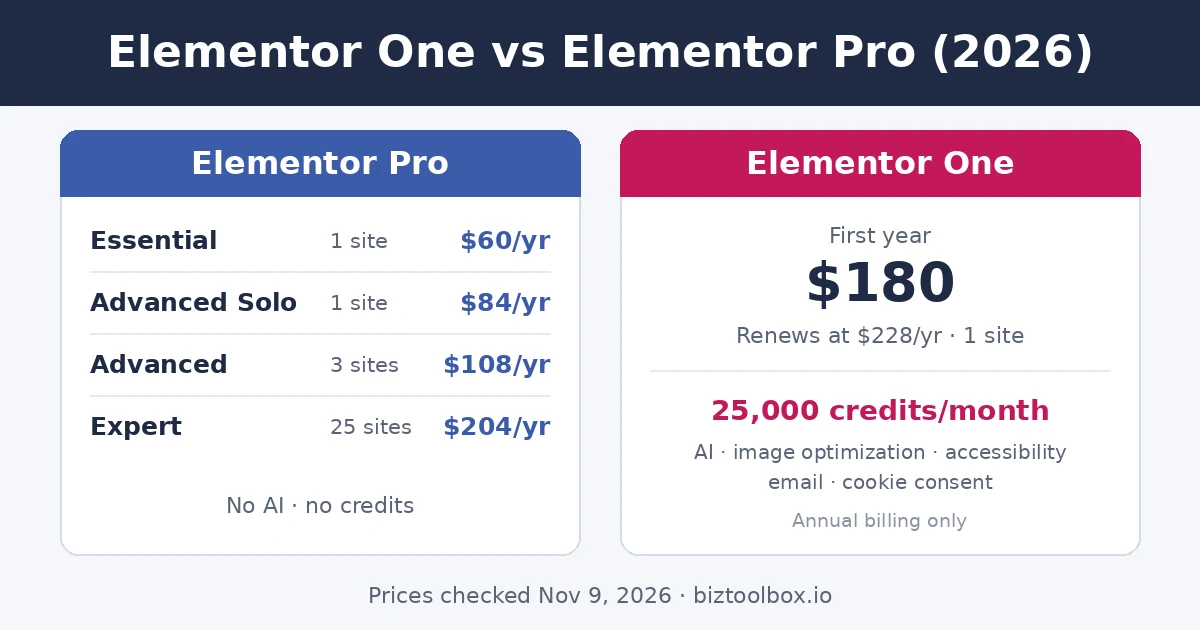
Elementor One vs Elementor Pro comes down to one question: do you want AI and site services bundled in, or just the page builder? Elementor Pro starts at $60/year for one site and includes no AI. Elementor One costs $180 for the first year (it renews at $228/year) and adds 25,000 monthly credits for AI, image optimization, accessibility fixes, email delivery and cookie consent. If you only need the builder, buy Pro. If you would otherwise pay for those extras separately, One is usually the better deal.
I run an agency that builds and updates a lot of client sites, so I look at every tool the same way: does it save real hours for what it costs? Below you’ll find every Pro and One plan, how the credits work and what each plan includes, so you don’t pay for things you won’t use.
Every price below comes from Elementor’s official pricing page. If you want my full take on the builder itself, read my Elementor Pro review. If you already own Pro and are thinking about switching, my post on whether to upgrade to Elementor One in 2026 covers that decision from an agency point of view.
What’s the Difference Between Elementor One and Elementor Pro?
Elementor Pro is the paid version of the Elementor page builder for WordPress. Elementor calls the builder part “Editor Pro.” It unlocks the Theme Builder, the Form Builder, extra widgets, dynamic content and (on most plans) the Popup Builder and WooCommerce tools. That’s it: you get design tools, and nothing that runs on credits.
Elementor One is a bundle. It includes the full Editor Pro feature set, then adds a set of connected services that run on a shared monthly pool of “One credits”: AI generation (text, code, images and layouts), image optimization, site accessibility fixes, email deliverability and cookie consent. It also includes a site management dashboard for plugin and theme updates, performance tracking and database clean-up.
So the real comparison isn’t “which builder is better.” The builder is the same. The question is whether the extra services are worth the higher price for your site.
Elementor One vs Elementor Pro Pricing (2026)
Elementor sells these plans on annual billing only. There is no month-to-month option. The pricing page shows a monthly figure for comparison, but you pay for the year up front. You can also choose 2-year or 3-year terms, which the pricing page advertises as up to 23% off and up to 34% off respectively.
| Plan | Price (1-year term) | Renews at | Sites | AI and One credits | Best for |
|---|---|---|---|---|---|
| Pro Essential | $60/year | $60/year (no separate renewal rate shown) | 1 | None | A basic brochure site |
| Pro Advanced Solo | $84/year | $84/year (no separate renewal rate shown) | 1 | None | One professional or eCommerce site |
| Pro Advanced | $108/year | $108/year (no separate renewal rate shown) | 3 | None | A few sites |
| Pro Expert | $204/year | $204/year (no separate renewal rate shown) | 25 | None | Freelancers with many client sites |
| Elementor One | $180 first year | $228/year | 1 | 25,000 credits/month | One site that needs AI and extras |
| Elementor One Agency | $432 first year | $540/year | Unlimited | 350,000 credits/month | Agencies |
A few things stand out. The cheapest way into the full Pro feature set (Popup Builder, custom CSS, WooCommerce widgets) is Advanced Solo at $84/year. Elementor One costs $96 more than that in year one and $144 more per year after renewal. For an agency, One Agency is about twice the first-year price of Pro Expert, but it lifts the cap from 25 sites to unlimited and adds the credit pool.
Also note the renewal jump on One. The $180 price is a first-year discount (the page shows a regular rate of $19/month, billed annually). Budget for $228 from year two. The Pro plans don’t show a separate renewal rate on the pricing page, and Elementor states that all subscriptions renew at list price, so confirm the exact figure at checkout.
What Each Plan Includes: Feature-by-Feature
This is where people get tripped up. “Pro” isn’t one plan, and the cheapest Pro plan is missing several features. Here’s what the pricing page lists for each plan.
| Feature | Essential | Advanced Solo / Advanced | Expert | One | One Agency |
|---|---|---|---|---|---|
| Editor Pro widgets | 57 | 85 | 85 | 85 | 85 |
| Theme Builder | Yes | Yes | Yes | Yes | Yes |
| Form Builder | Yes (form submissions not included) | Yes | Yes | Yes | Yes |
| Dynamic content with custom fields and post types | No | Yes | Yes | Yes | Yes |
| Popup Builder | No | Yes | Yes | Yes | Yes |
| Custom code and CSS | No | Yes | Yes | Yes | Yes |
| eCommerce (WooCommerce) features | No | Yes | Yes | Yes | Yes |
| Collaborative Notes | No | Yes | Yes | Yes | Yes |
| Cloud Templates storage | 10 | 20 / 30 | 5,000 | 30 | 50,000 |
| AI (code, copy, images, layouts) | No | No | No | Yes (credits) | Yes (credits) |
| Image optimization | No | No | No | Yes (credits) | Yes (credits) |
| Site accessibility scans and AI fixes | No | No | No | Yes | Yes |
| Email deliverability | No | No | No | Yes (credits) | Yes (credits) |
| Cookie consent | No | No | No | Yes (credits) | Yes (credits) |
| Site management dashboard | No | No | No | Yes | Yes (multi-site) |
The key takeaway: no Pro plan includes Elementor AI. On the current pricing page, AI generation appears only on the One plans. If AI inside the editor is the reason you’re shopping, Pro alone won’t give it to you.
The second takeaway: Elementor One is a one-site plan. It has the same 85 widgets and 30 cloud templates as Pro Advanced, but only covers one website. If you need two or three sites and don’t care about AI, Pro Advanced at $108/year covers three sites for less than One costs for one.
How Elementor One Credits Work
Every One plan comes with a monthly pool of credits. Elementor One gets 25,000 a month, and One Agency gets 350,000. You spend them on whichever services you use that month. Using the builder itself costs nothing, and neither do accessibility scans or site management.
Credits reset every month and don’t roll over. If you run out, you either wait for next month’s refill or move to a higher plan. On One Agency, the pricing page says you can use your credits across any of your client sites. Here’s the credit cost per action listed on the pricing page:
| Action | Credits per action | Roughly how many with 25,000 credits (my math) |
|---|---|---|
| Editor Pro, accessibility scans, site management | 0 | Unlimited |
| 1 AI accessibility fix | 20 | About 1,250 fixes |
| 1 image optimized | 10 | About 2,500 images |
| 1 email delivered | 10 | About 2,500 emails |
| 1 cookie consent or 1 cookie scan | 1 | About 25,000 |
| 1 AI action (text, code, image, container) | 1 to 40, depending on the request | About 625 to 25,000 |
In practice you’ll mix these. A small business site sending a few hundred form-notification emails and optimizing a few dozen images a month would use only a slice of 25,000 credits. A busy store that sends a lot of transactional email could burn through them faster. Elementor also notes that credit costs can change at any time, so check the table on the pricing page before you plan around a number.
What You Get for the Extra Money with Elementor One
Here’s what the $96 to $144 a year over Advanced Solo actually buys, according to Elementor’s pricing page.
AI for copy, code, images and layouts
Elementor One includes AI that can generate copy, custom code, images and container layouts inside the editor. Each request costs between 1 and 40 credits depending on what you ask for. This is the main feature that separates One from Pro.
Image optimization
Bulk image processing with WebP and AVIF conversion. Elementor values this at $60/year on the One plan. Smaller image files load faster, and switching to modern formats like WebP and AVIF is one of the easier page-speed wins.
Site accessibility
Accessibility scans (free) plus AI-powered fixes (20 credits each), and a usability widget with more than 15 tools. Elementor values this at $120/year on One. If accessibility matters for your business, the W3C’s WCAG guidelines are the standard to read up on, because a widget alone doesn’t make a site compliant.
Email deliverability, cookie consent and site management
Email deliverability sends WordPress emails (like form notifications) without a separate SMTP plugin, at 10 credits per email. Elementor values it at $60/year. Cookie consent adds a banner with cookie scanning, script blocking and consent records. The site management dashboard handles plugin and theme updates, performance tracking, security alerts and database clean-up.
One limit to know: Elementor’s email feature sends your site’s mail through Elementor’s service. You authenticate your domain with DNS records (SPF, DKIM and DMARC), so mail can come from @yourdomain.com. Elementor’s setup guide doesn’t cover connecting to a Microsoft 365 mailbox. On one client site, form emails had to go through the client’s own Microsoft 365 account, so we used WP Mail SMTP with its Microsoft 365 mailer instead. This matters more after December 2026, when Microsoft turns off password-based SMTP by default for existing Microsoft 365 tenants.
Add up Elementor’s own stated values for image optimization, accessibility and email and you get $240/year on the One plan. Those are Elementor’s numbers, not mine. The extras are only worth that to you if you would otherwise pay for similar plugins or services.
Elementor AI and Design: Where It Helps
I’ve used Elementor AI for writing text, but rarely for design. In my honest opinion, Elementor’s AI tools are a little lacking. Their new AI site builder does an okay job, but mainstream AI tools like Claude are far better at both content writing and design. If you’re on a budget, try the AI writing tools that come with Elementor One. If you have the budget for a Claude subscription on top of Elementor, whether that’s Pro or One, that’s the setup I’m testing now (more on that below).
Elementor says its AI can also build layouts and containers and generate images and custom code. I’ve tested the design side, and it wasn’t great. So far, starting from an Envato template kit and using a more established AI tool like Claude to customize it has been way cleaner on the design front. If design help is your main reason for considering One, test it during the 30-day money-back window before you rely on it.
For design work, I’ve been testing Claude in Chrome, an AI assistant that works right in the browser, alongside Elementor. I’m putting together a video on how it helps with design, and I’ll link it here once it’s live.
I use Elementor One Agency for my client sites. Unlimited sites and one shared credit pool fit the way an agency works, and it’s been great for what I need. My clients get to use some of the most useful Elementor One features, like image optimization, built-in email sending without an SMTP plugin, and some of the AI tools. Some of those features make One completely worth the extra cost. Check the feature list above and see what makes the most sense for you. If you already use other plugins for those jobs, Pro may be all you need.
Elementor Pro: Pros and Cons
Elementor Pro pros
- Lower price: $60 to $204/year depending on site count
- Same Editor Pro builder as Elementor One on Advanced Solo and above
- Pro Advanced covers 3 sites and Pro Expert covers 25, both cheaper than One for multi-site work
- No credits to track; you’re never cut off mid-month
Elementor Pro cons
- No AI included on any Pro plan
- Essential (the $60 plan) lacks the Popup Builder, custom CSS, WooCommerce widgets and form submissions
- Image optimization, email delivery and accessibility need separate plugins or services
Elementor One: Pros and Cons
Elementor One pros
- Full Editor Pro plus AI, image optimization, accessibility fixes, email deliverability and cookie consent in one subscription
- One shared credit pool you can shift between services month to month
- Site management dashboard for updates and database clean-up
- One Agency covers unlimited sites, and credits can be used across client sites
Elementor One cons
- Standard One covers only one site
- First-year price of $180 renews at $228
- Credits reset monthly and don’t roll over
- Credit costs per action can change, and AI requests vary from 1 to 40 credits
- Hosting isn’t included (Elementor Host is sold separately)
- Built-in email authenticates your domain but doesn’t send through a Microsoft 365 mailbox
Which Should You Choose?
Here’s how I’d decide:
Choose Elementor Pro if…
- You want the builder and nothing else. Your hosting company already handles image compression and email, or you use plugins you’re happy with.
- You build more than one site and don’t need AI. Pro Advanced ($108/year, 3 sites) or Pro Expert ($204/year, 25 sites) is far cheaper per site than One.
- You already write copy with another AI tool and don’t need it inside the editor.
- You need a popup, custom CSS or WooCommerce: skip Essential and start at Advanced Solo ($84/year).
Choose Pro plus your own AI assistant if…
- You already pay for an AI assistant and want to spend less on Elementor. Pro Advanced Solo ($84/year) plus an assistant like Claude in Chrome can cover copy and code help, but you’ll still need separate plugins for image optimization, email and cookie consent.
- You’re comfortable with a DIY setup. Start at Advanced Solo, not Essential: if you want an assistant to add custom CSS or code, Essential doesn’t include it.
- I’m testing this setup myself for a video series on building with Elementor and Claude in Chrome.
Choose Elementor One if…
- You run one business site and want AI writing help inside the editor.
- You would otherwise pay for image optimization, an SMTP or email delivery service, an accessibility tool and a cookie banner.
- You want an all-in-one setup: image optimization, accessibility, cookie consent and site management on one bill and one dashboard, instead of four or five separate plugins.
Choose Elementor One Agency if…
- You manage more than 25 client sites, or expect to.
- You want AI, image optimization and email delivery available on every client site from one credit pool.
- The $432 first-year price (renewing at $540) is less than what you pay today for those services across your clients.
If you’re still comparing builders entirely, my Elementor vs Divi comparison covers that decision, and the tools page lists everything I recommend for small business sites.
How to Upgrade from Elementor Pro to Elementor One
If you already pay for Pro, you don’t need to cancel it first. According to Elementor’s pricing FAQ, upgrading from Pro to One is prorated: the unused value of your current Pro plan is credited toward One, and you pay the difference. If you cancel Pro first, you lose that credit.
- Log in to your my.elementor account.
- Open the Subscriptions tab and select your active Pro plan.
- Choose the upgrade option and pick the One plan you want.
- Check the prorated price at checkout before you confirm.
Elementor also says existing Pro subscriptions aren’t affected if you choose to stay on Pro. If you’re weighing the switch, my Elementor One upgrade review walks through the agency-side reasons.
Frequently Asked Questions
Does Elementor Pro include AI?
No. On the current pricing page, none of the Pro plans (Essential, Advanced Solo, Advanced or Expert) list AI. AI generation for copy, code, images and layouts is listed only on Elementor One and One Agency, where it runs on monthly credits.
How much does Elementor Pro cost in 2026?
Elementor Pro costs $60 to $204 a year, depending on the plan: Essential is $60 (1 site), Advanced Solo $84 (1 site), Advanced $108 (3 sites) and Expert $204 (25 sites). Elementor only sells annual plans, and 2-year and 3-year terms are discounted. Prices checked on November 9, 2026.
Is Elementor One worth it over Elementor Pro?
It’s worth it if you’ll use the AI and at least one or two of the extra services, such as image optimization or email delivery, on a single site. If you only want the builder, or you run several sites without needing AI, Pro is cheaper. Pro on its own is worth it if you build in Elementor regularly and need the Theme Builder and forms. Start at Advanced Solo if you also need popups, custom CSS or WooCommerce.
Can I pay for Elementor monthly?
No. Elementor sells annual plans only, with 1-year, 2-year and 3-year terms. The per-month figure on the pricing page is for comparison; you pay for the full term up front. The 30-day money-back guarantee applies to annual plans.
Do Elementor One credits roll over?
No. You get a fresh pool each month (25,000 on One, 350,000 on One Agency), and unused credits expire at the end of the month.
Does Elementor One include hosting?
No. Elementor One doesn’t include hosting. Elementor Host is a separate product.
Will I lose money if I upgrade from Pro to One mid-term?
Not according to Elementor. The upgrade is prorated, so the unused part of your Pro subscription is credited toward One. Upgrade from inside your Elementor account rather than cancelling Pro first.
Is there a free version of Elementor?
Yes. The free Elementor plugin on WordPress.org includes the drag-and-drop editor and basic widgets. It’s a good way to test the editor before paying for Pro or One.
Get My Free Agency Efficiency Stack
Elementor is one piece of how I build sites efficiently. I put the full list of tools and workflows I use to run my agency into a free guide, the Agency Efficiency Stack. Get the free Agency Efficiency Stack here, and if you’re ready to pick a plan, you can see the current Elementor plans.
For more on running a lean set of tools, read why every business owner needs a toolbox of AI tools.